
Existing Qabool request
You already have, or expect, a host-acceptance request and need help finding Qabool Service, reading “No acceptance request”, or checking a request that was already accepted.
Absher Qabool (قبول) · host acceptance
To accept an Umrah visa request in Absher, log in to Absher and open Qabool Service (قبول). On the desktop screen recorded for this guide, the breadcrumb is Electronic Services, then Services, then General Services, then Qabul. Open View Pending Requests and choose Accept (قبول). The Saudi resident host (Iqama holder) does this in their own Individuals account. UmrahVisa.in does not log in, and this site is not Absher.
This is the hosted/Absher acceptance step. It is not Standard Umrah visa assistance from India, and accepting the request does not by itself issue the visa. Saudi authorities issue the visa.
Many hosts search by pasting the exact Arabic text. The wording below is the SMS recorded from the original page, including its actual spelling.
عزيز ي العميل، تمت الموافقة على طلبك من الحج و العمرة . فضلاً زيارة أبشر "خدمة قبول" لإكمال الإجراء

UmrahVisa.in does not log into a customer’s Absher account. Keep the login with the host.
This is the sequence used on the hosted/Absher route this agency coordinates. It is not a Standard India file, and it is not a promise that every hosted file follows identical Saudi screens. The operator workflow is broadly shared with how we process your Umrah visa. A hosted file adds this Absher acceptance step.
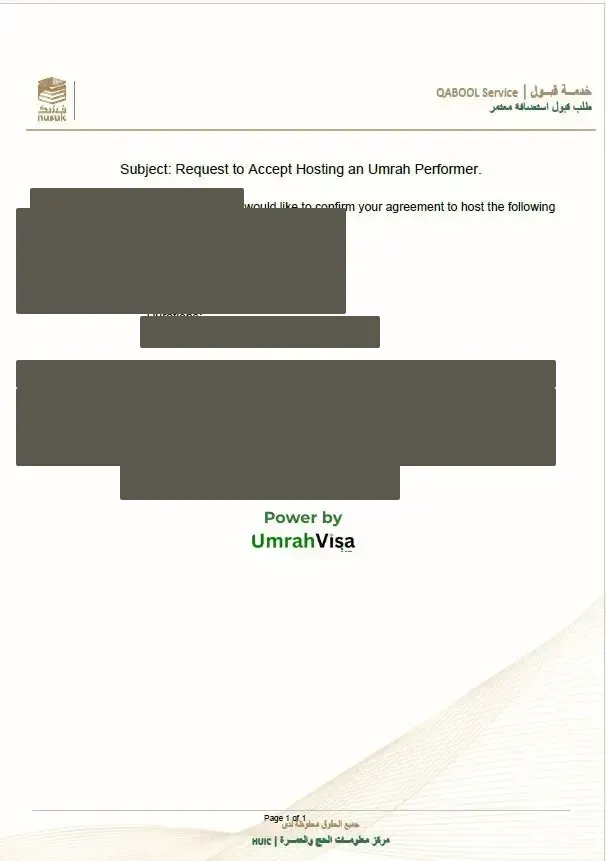
These menu names match the path recorded for this guide. Absher may rename a screen. Follow the words Absher shows. Official Absher login: https://www.absher.sa/.
Absher Individuals → Electronic Services → Services → General Services → Qabul → View Pending Requests → Accept
Menu names can differ between the Absher app and the desktop site. Look for Qabool Service / قبول under General Services or a similar request menu. Absher's service card places Qabul Service under General Services: the host views a request, then accepts or rejects it, and can review a request already accepted or rejected.
Do not reject a recognised request unless you are sure it is wrong. In this agency’s files, rejection has often meant the operator had to send the request again. That is desk experience, not a published Absher rule.
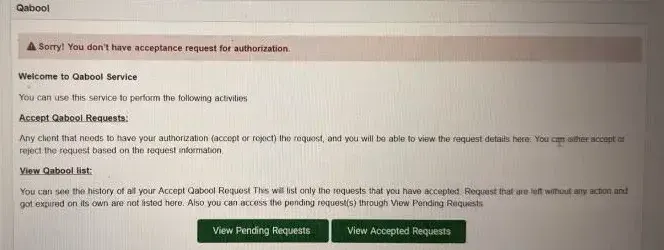
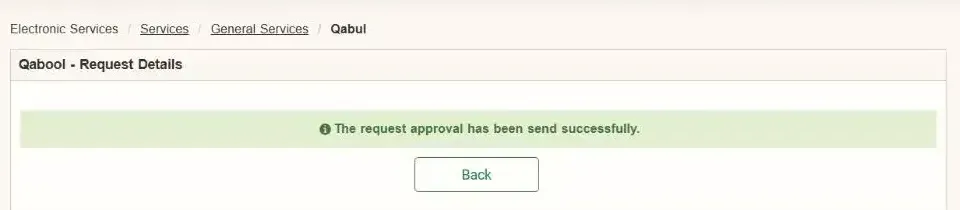
The host can complete the Absher clicks. Checking what was submitted on the file is an operator step. UmrahVisa.in cannot open Absher to look, and this website is not Absher support.
Absher is not showing a pending Qabool request in that Individuals account. Confirm you are in the Individuals login, not a business login. If it is still missing, the submitting operator should re-check the host Iqama and that the request was filed against the correct host. Timing varies. This page does not treat a missing request as a 24-hour system failure.
Try the Absher mobile app and the desktop site, then log out and in again. If it still cannot be accepted, the operator should check host-profile and file-linkage details. Do not assume every pending request is a system error.
Qabool is not visa issuance. After Accept, the file proceeds toward issuance subject to Saudi authority approval. If you already have an issued visa, use the visa check page. This site does not look up Saudi records.
The host can confirm the name and Iqama they are logged in with. Matching those details to the submitted file is the operator’s check. A mismatch can leave Absher empty even when the family believes the file was sent.
Qabool Service may sit under a slightly different label in the app and on the desktop site. Use the same Individuals account on both. If one view is empty, try the other before asking the operator to re-file.
Hosting acceptance is a responsibility tied to the host account. Only accept a request you recognise.
If you are arranging Umrah for family travelling from India and need more than the Absher acceptance instructions, our team coordinates eligible host-linked filing, applicable BRN arrangements, Qabool guidance and application follow-up.
Hosted Umrah assistance from ₹14,990 per person. Final quotation confirmed before payment.
Omni Trips and Hospitality Services, Bengaluru. The items below are the identifiers already recorded for this business. A credential that is not listed here has not been added.
Saudi Arabia introduced a one-year multiple-entry Umrah visa in July 2026. Eligible holders may enter more than once during the 365-day validity, within the remaining cumulative stay of up to 90 days. That allowance does not reset on every entry, and re-entry is not automatic. A hosted Absher visa is a different category: this note does not say every hosted visa permits repeated entry.
Accepting a hosting request in Absher Qabool and reactivating a visa after departure are different processes. The 20 July 2026 ministry notice requires a new approved Nusuk service package and the applicable permits before a later visit on that multiple-entry visa. Whether your file is that visa has to be checked.
Travelling back to India and planning another visit to Saudi Arabia? Our team can review your visa category, remaining validity, previous stay and applicable reactivation requirements before helping coordinate the next visit.
Re-entry coordination charges depend on the required services. Request a quotation before proceeding.
That quotation is separate from hosted Umrah assistance. A fresh visa fee is not promised to be unnecessary.
These are two different files. WhatsApp opens private assistance with Omni Trips and Hospitality Services. It is not an Absher portal.
You already have, or expect, a host-acceptance request and need help finding Qabool Service, reading “No acceptance request”, or checking a request that was already accepted.
You need the wider hosted/Absher file: host linkage, Qabool guidance and the arrangements around that route. That is not Standard visa assistance from India.
It usually means a hosted Umrah file has reached a stage that needs host action in Absher under Qabool Service (خدمة قبول). Open View Pending Requests and review the guest names before choosing Accept (قبول). The message is not confirmation that the Umrah visa has been issued. Do not share OTPs, Nafath codes or Absher credentials.
On the hosted route this page describes, the Saudi resident host (the Iqama holder) accepts it in their own Absher Individuals account. UmrahVisa.in does not log in, and the host should not send an OTP or a Nafath code.
On the desktop screen recorded for this guide, the breadcrumb is Electronic Services, Services, General Services, then Qabul (Qabool Service). Open View Pending Requests and choose Accept (قبول). The Absher app may use different labels. Follow the words on the screen.
Absher is not currently showing a pending Qabool request in that host account. That can happen when the request has not yet become available, or when the host Iqama or file linkage does not match. The host can confirm they are in the Individuals account. Checking the Iqama used on the file is an operator step. This website cannot see the Absher inbox.
The host can try the Absher app and the desktop site, then log out and in again. If it still cannot be accepted, the submitting operator should check the host profile and file linkage. Do not assume every pending request is a system error.
Acceptance in Absher is not the same thing as a visa being issued. Saudi authorities issue the visa. After acceptance, the file proceeds toward issuance subject to Saudi authority approval. UmrahVisa.in cannot see whether a Saudi system has finished the file.
Many hosts use Nafath to verify an Absher login. Keep the Nafath app ready, then open Qabool Service yourself. Never send a Nafath approval, OTP or Absher password to UmrahVisa.in or anyone else.
No. This page is the host’s Qabool acceptance step on a hosted/Absher file. The Standard assistance file from India is a different workflow. Use the India page if there is no Saudi resident host.
Share the host city, the family relationship and whether Absher shows no request, a pending request, or an accepted request with a still-pending visa. Keep the Absher login with the host.